How to Stop Chasing Clients for Tax Documents: A Simple Document Collection System
2026-09-16
"Just following up on the documents I requested last week."
If you've typed that sentence more than once for the same client, you're not alone.
For accountants and tax professionals, chasing clients for missing documents can become one of the most repetitive parts of tax season. You send a request, wait, follow up, send another reminder, and sometimes discover that the client already sent one of the documents several days ago.
The problem usually isn't that clients don't want to cooperate.
The problem is that document collection is often being managed through a system that was never designed for it.
Email threads don't show what's missing. Generic requests aren't always clear. Attachments get buried. And when reminders depend on your memory, document collection becomes another task on an already crowded to-do list.
The good news is that you don't necessarily need expensive practice-management software to improve the process.
In this guide, we'll look at why document chasing happens, how much time it can consume, what a proper document collection workflow should look like, and how you can build a simpler system for your accounting or tax practice.

Quick Check: Are You Spending Too Much Time Chasing Documents?
Before changing your workflow, take a quick look at how you're currently collecting documents.
If several of these sound familiar, your document collection process probably needs attention:
- You send the same document request more than once
- You aren't immediately sure which clients still have outstanding documents
- Clients regularly ask, "Which documents do you still need?"
- Clients say, "I already sent that," and you have to search through email to confirm
- Your document requests are long paragraphs instead of individual items
- Clients send several attachments without explaining what each file contains
- You manually send most of your reminders
- There is no single place showing requested, received, and missing documents
- You spend time checking your inbox just to determine whether a client has submitted something
- Work frequently gets delayed because one or two documents are still missing
If that sounds familiar, the issue may not be your clients. It may be the workflow.
The Real Cost of Chasing Clients for Documents
Document chasing can look harmless because each individual follow-up only takes a few minutes. But those minutes accumulate.
Consider a simple example. If following up with one client takes 15 minutes and you have 100 clients, that's:
100 × 15 minutes = 25 hours
And that's only one round of follow-ups. If the same clients require multiple reminders throughout the year, the time can quickly become significant.
But the cost isn't limited to the time spent sending emails.
1. Work gets delayed
When required documents don't arrive, the actual tax or accounting work can't always begin. That pushes work closer to deadlines and creates unnecessary pressure.
2. Staff spend time on administrative work
A staff member checking email, updating spreadsheets, and sending reminders is spending time on coordination rather than higher-value accounting work.
3. Clients experience unnecessary friction
From the client's perspective, receiving repeated requests can be frustrating, particularly when they aren't sure what has already been submitted.
4. Missing documents become harder to track
The larger the client list becomes, the harder it is to rely on memory or individual email threads.
The real problem isn't one reminder. It's the absence of a shared, trackable process.
Why Clients Don't Send Documents on Time
It's tempting to assume that clients are simply forgetting. Sometimes they are. But there are several other reasons documents remain outstanding.
The request isn't specific enough
"Please send your tax documents" sounds simple to an accountant. To a client, it can raise several questions: Which documents? For what period? Do you need every bank statement? Do you need my spouse's documents too? What if I don't have one of them?
A specific request removes that uncertainty. Instead of "Please send your tax documents," use:
- W-2 from employer
- 1099-INT from bank
- Mortgage interest statement
- Property tax statement
- Brokerage statement
Now the client knows exactly what you're asking for.
There is no visible progress
If a client sends three files but still has four outstanding documents, an email thread doesn't provide an obvious way to see that. A checklist does.
Documents are scattered across different conversations
One file might be in an email from Monday, another in an email from Thursday, and another in a text message. The result is more searching for everyone.
Reminders depend on memory
If reminders are sent manually, document collection competes with everything else on your schedule. That's why some clients receive several reminders while others don't hear from you until the deadline is approaching.
What an Effective Document Collection System Should Do
A good document collection system doesn't need to be complicated. At minimum, it should make four things easy.
1. Create specific document requests
Every required document should have its own item — for example, W-2, 1099-INT, 1099-DIV, mortgage interest statement, charitable donation receipts. This is much easier to understand than one large paragraph.
2. Show what's missing
You should be able to look at a client and immediately understand: Received: 4, Pending: 2. The client should be able to see the same thing.
3. Make uploading simple
The fewer steps between the client finding a document and submitting it, the better. Ideally, they shouldn't need to install another application or figure out a complicated workflow just to upload a PDF.
4. Reduce manual follow-up
The system should make it easier to remind clients about outstanding items without requiring you to repeatedly check every client's status.

Email vs. Checklists vs. Client Portals
Different approaches can work for different firms.
| Method | Easy to start | Tracks missing items | Shared status | Good for recurring collection |
|---|---|---|---|---|
| Yes | No | No | Limited | |
| Spreadsheet + email | Yes | Partly | Partly | Moderate |
| Shared folder | Yes | Limited | Limited | Moderate |
| Client portal | Moderate | Yes | Yes | Yes |
| Dedicated document collection link | Yes | Yes | Yes | Yes |
Email is convenient, but convenience doesn't necessarily mean visibility. A structured checklist gives both sides a much clearer picture of what has been requested and what is still outstanding.
How to Improve Document Collection Without Expensive Software
You don't have to completely change your technology stack overnight. You can improve the process with a few simple changes.
Use a checklist instead of a paragraph
Don't ask for "all tax documents." List every document individually.
Give clients a clear deadline
"Please send these documents by September 25" is easier to act on than "Please send them as soon as possible."
Use consistent reminders
Create a standard follow-up schedule — for example, Day 0: initial request, Day 5: first reminder, Day 10: second reminder, Day 15: final reminder. The exact schedule can vary depending on your practice and deadlines.
Keep one source of truth
Don't maintain one list in your inbox, another spreadsheet, and another folder. Choose one place where document status is tracked.
Make the client's next action obvious
A client should never have to wonder, "What exactly do I need to do now?" The answer should be obvious when they open the request.
How to Collect Tax Documents More Securely
Convenience is important, but tax documents contain sensitive financial and personal information. Your document collection process should therefore consider security as well as speed.
A few basic practices can reduce unnecessary exposure:
- Avoid sending sensitive documents through ordinary text messages
- Verify recipient email addresses before sending files
- Use strong, unique passwords for systems that contain client information
- Enable multi-factor authentication where available
- Give users only the access they actually need
- Keep software and operating systems updated
- Avoid uploading confidential documents to unfamiliar services simply because they are free
- Use secure file-transfer or client-portal solutions when appropriate
- Have a clear process for handling documents sent to the wrong recipient
The goal isn't to make document collection complicated. It's to make the secure option the easy option.
A Simpler Way to Collect Client Documents
This is where a dedicated document collection workflow can make a difference.
Kredofy lets accountants create a document checklist for each client and give the client a secure upload link.
Instead of sending a long email saying "Please send your tax documents," you can create a structured request such as:
- ☐ W-2
- ☐ 1099-INT
- ☐ 1099-DIV
- ☐ Mortgage interest statement
- ☐ Property tax statement
- ☐ Charitable donation receipts
The client can see what is required and upload files against the appropriate request. From the accountant's side, the checklist provides a clearer view of what has been received and what is still outstanding. And because the client can access the request through a link without creating an account, there is less friction between receiving the request and actually submitting the documents.
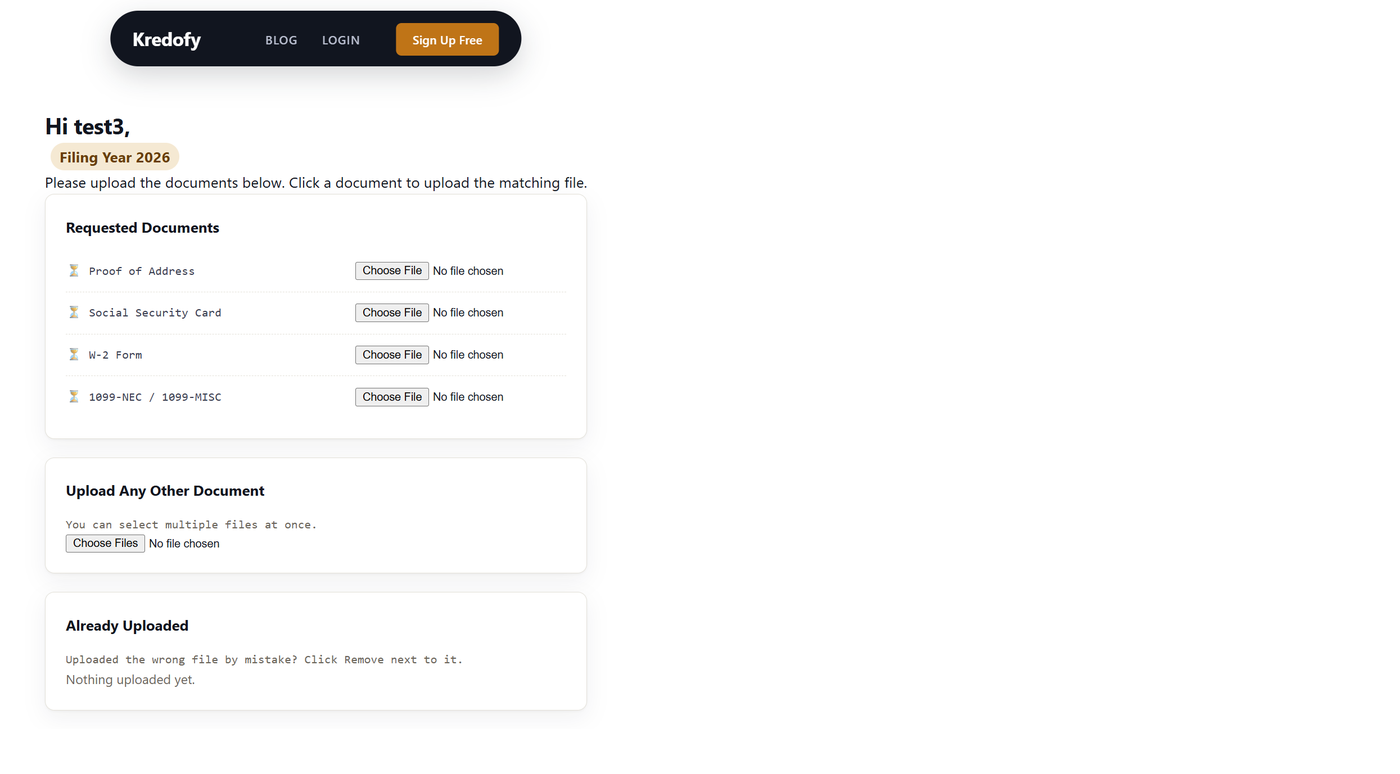
Kredofy is currently free to try for up to three clients, so a small firm can test the workflow before deciding whether it fits its broader process.
A Better Document Collection Workflow
A simple workflow can look like this:
Step 1: Create the request
Create a checklist containing every document required from the client.
Step 2: Send one link
Send the client their document collection link instead of creating a long email chain.
Step 3: Client reviews the checklist
The client can see exactly what is required.
Step 4: Client uploads documents
Each document is uploaded against the relevant request.
Step 5: Review what's received
You can see which requested items have been submitted and which remain outstanding.
Step 6: Follow up on missing items
Instead of asking the client to resend everything, follow up specifically on the documents that are still missing.
Step 7: Start the work
Once the required documents are collected, your team can move into the actual accounting or tax work without spending additional time reconstructing what the client has already submitted.
The difference is small in concept but significant in workflow:
Request → Checklist → Upload → Track → Complete
instead of:
Email → Wait → Search → Follow up → Search again → Repeat
Frequently Asked Questions
Why do accountants spend so much time chasing clients for documents?
Because many firms still manage document requests through email. Email is useful for communication, but it doesn't naturally provide a structured checklist showing which documents have been requested, received, or are still missing.
How can I reduce the number of document-chasing emails?
Start by making every request specific and trackable. Use individual checklist items, establish clear deadlines, and use a consistent reminder process. A dedicated document collection system can further reduce manual follow-up by giving both the accountant and client visibility into outstanding items.
Is email a good way to collect tax documents?
Email can work for some situations, but it has limitations. Attachments can become difficult to track, sensitive files can end up in the wrong thread, and neither side gets a simple view of which requested documents are still missing. For recurring collection, a secure document-sharing or client-portal workflow can provide better organization.
What should a tax document checklist include?
It depends on the client and engagement. A checklist might include W-2s, 1099s, bank statements, brokerage statements, mortgage interest statements, property tax documents, business records, charitable donation receipts, and other documents relevant to the client's tax situation. The important part is to make each required document a separate, clearly labeled item.
Can I improve document collection without buying software?
Yes. You can start with itemized requests, clear deadlines, scheduled reminders, and a simple tracking spreadsheet. These changes can improve organization considerably. The main limitation is that manual systems still require someone to maintain the tracker and communicate status — a dedicated collection tool automates more of that workflow.
What happens when a client says they already sent a document?
If you're relying on email, you'll probably need to search through previous messages. With a structured checklist, you can check the corresponding document item and determine whether the file has already been submitted.
How does Kredofy help with document collection?
Kredofy provides a checklist-based document collection workflow. Accountants can create requests for individual clients, send them a secure link, and track which documents have been received and which are still pending. Clients don't need to install an app or create an account simply to submit their documents.
Final Thoughts
Chasing clients for documents isn't necessarily a client problem. In many cases, it's a workflow problem.
When document requests are buried inside email threads, nobody has a reliable shared view of what's missing. The result is repeated reminders, unnecessary searching, and work that gets pushed closer to deadlines.
A better process starts with something simple: make every document request clear, make its status visible, and make submission easy.
You don't need to rebuild your entire accounting practice to get started. Even moving from a paragraph-based email to a structured checklist can make a meaningful difference.
K Written by the Kredofy team — we build simple document collection tools for accountants and tax professionals who want to spend less time chasing missing files and more time doing the work that matters.
If you want to take the process a step further, Kredofy gives you a simple way to create client-specific document checklists and collect files through a single link. See how Kredofy works →